Recipes
Pipelines first: the jobs that need more than an image library — a model step in the same job as deterministic ones, a subject that keeps a character or a product the same from run to run, a template rendered once per row. Every picture below is what the pipeline made on a real run, and all but the first — which the quickstart walks through — are also complete workflows in the open-source recipes repo, each a Node script and an n8n template. Then presets to copy, for social sizes, product shots, web delivery, print and a few looks.
Pipelines
Marketplace cut-out
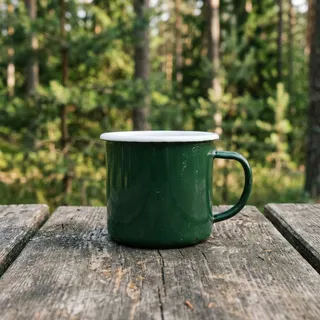
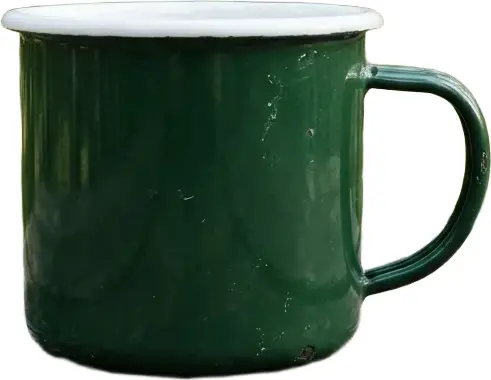
A product photo in, a listing-ready picture out: background removed, trimmed to the product, on white, a WebP under 50 KB. Four steps, one preset, one job — the dry run prices it step by step, and a failed item says which step it stopped at.
The preset — save it once, run it by slug
{
  "name": "Marketplace cut-out",
  "slug": "marketplace-cutout",
  "description": "Background removed, trimmed to the product, on white, a WebP under 50 KB.",
  "steps": [
    {
      "op": "remove_bg"
    },
    {
      "op": "trim"
    },
    {
      "op": "flatten",
      "parameters": {
        "background": "#ffffff"
      }
    },
    {
      "op": "compress",
      "parameters": {
        "format": "webp",
        "maxBytes": 50000
      }
    }
  ]
}
Save it and run it on your first image in the quickstart. It shows a model step and three deterministic ones, as one job.
Same character, every card
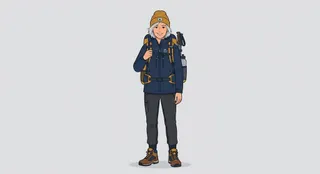
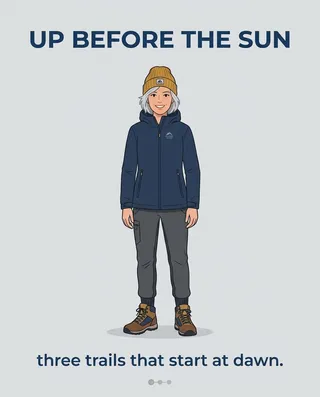
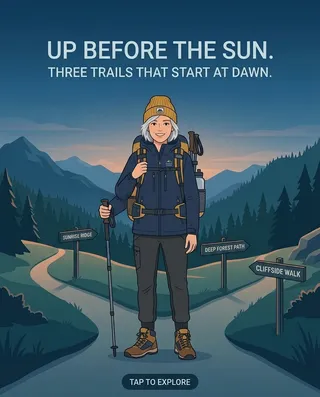
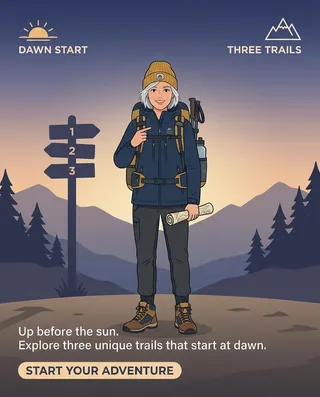
Sheet rows in, four cards per row out, the same character on every one. The subject's reference image pins the look and its descriptor pins the words; each row's prompt writes {{subject.hero}} instead of describing her again, so the fortieth row draws the character the first one did.

The preset — saved once
{
  "name": "Carousel brand character",
  "slug": "carousel-brand",
  "subjects": [
    {
      "name": "hero",
      "referenceAssetIds": [
        "ast_…"
      ],
      "descriptor": "a woman in her thirties with short silver hair, a navy rain jacket and a mustard beanie, drawn in a clean flat illustration style"
    }
  ],
  "steps": [
    {
      "op": "generate",
      "model": "google/gemini-3.1-flash-image-preview",
      "prompt": "{{subject.hero}} in a fresh scene. Keep face, hair, outfit and proportions exactly as in the reference images. Clean composition, no text.",
      "parameters": {
        "aspectRatio": "4:5"
      }
    }
  ]
}
Each row — POST /api/v1/jobs, the row's prompt over the pinned version
{
  "presetId": "carousel-brand@1",
  "prompt": "Up before the sun. three trails that start at dawn. Social carousel card, {{subject.hero}} as the hero, clean background with room for text, 4:5 portrait.",
  "count": 4
}
The whole workflow, as a Node script and an n8n template: recipes/social-carousel. It shows a preset subject: reference images plus locked words.
The same product in every scene, every ad size
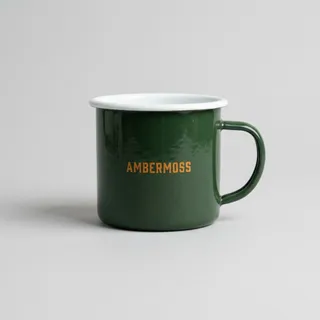
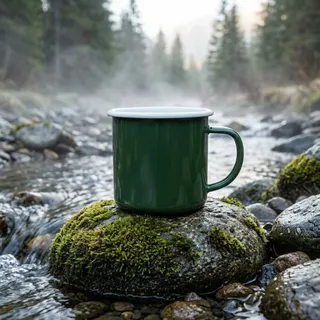
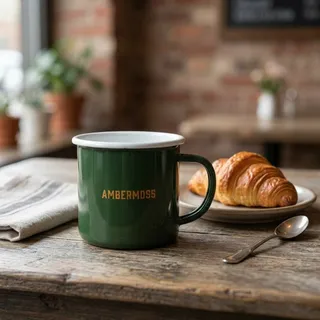
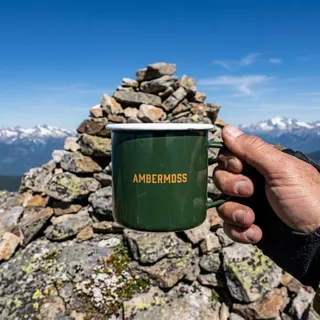
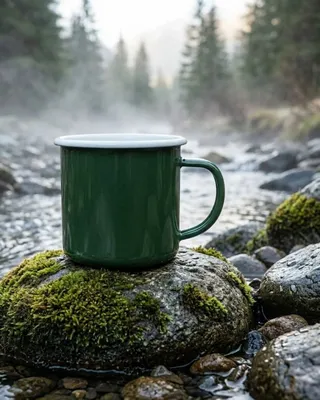
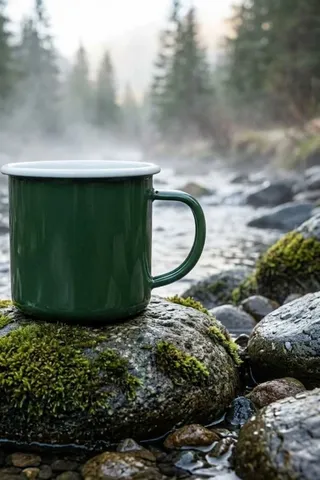
One product photo and a line per scene in; the same mug in every scene out, then every ad size of every scene from one resize job. Three scenes × three sizes is nine outputs, one call, one job to watch.

The preset — saved once
{
  "name": "Product scenes",
  "slug": "product-scenes",
  "subjects": [
    {
      "name": "product",
      "referenceAssetIds": [
        "ast_…"
      ],
      "descriptor": "a dark green enamel camping mug with a white rim and a small orange AMBERMOSS wordmark on the front"
    }
  ],
  "steps": [
    {
      "op": "generate",
      "model": "google/gemini-3.1-flash-image-preview",
      "prompt": "{{subject.product}} on a plain studio background. Product photography, the product sharp and fully in frame, no text.",
      "parameters": {
        "aspectRatio": "1:1"
      }
    }
  ]
}
Each scene — POST /api/v1/jobs
{
  "presetId": "product-scenes@1",
  "prompt": "{{subject.product}} on a mossy rock beside a mountain stream, morning mist. Product photography, the product sharp and fully in frame, no text."
}
Every size of every scene — one POST /api/v1/jobs
{
  "op": "resize",
  "assetIds": [
    "ast_…",
    "ast_…",
    "ast_…"
  ],
  "parameters": {
    "fit": "cover",
    "gravity": "attention",
    "withoutEnlargement": false
  },
  "variants": [
    {
      "name": "ig",
      "parameters": {
        "width": 1080,
        "height": 1350
      }
    },
    {
      "name": "x",
      "parameters": {
        "width": 1600,
        "height": 900
      }
    },
    {
      "name": "pin",
      "parameters": {
        "width": 1000,
        "height": 1500
      }
    }
  ]
}
The whole workflow, as a Node script and an n8n template: recipes/product-scenes. It shows a subject for a product, and variants: many sizes in one job.
Cut-out, packshot and web size from one upload
One product photo in, three variants out in parallel — a transparent cut-out, the photo padded with white, and a web size of at most 1200 px — each its own job with its own URL. Nothing is re-uploaded: every branch names the same asset.
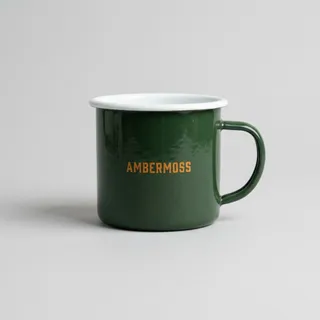
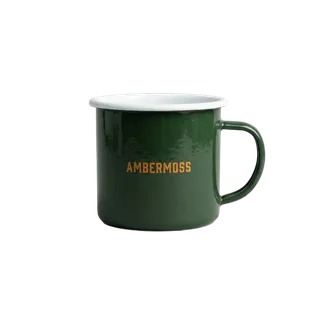
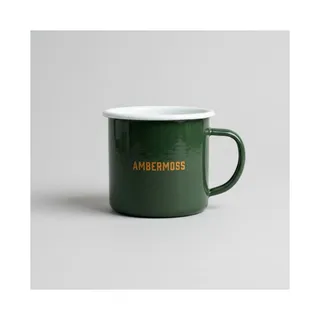
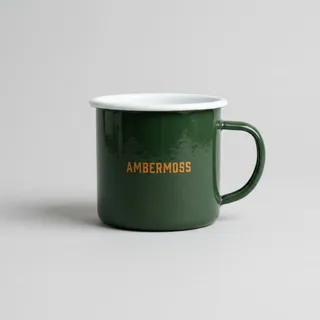
Three POST /api/v1/jobs over one asset id — the cut-out
{
  "op": "remove_bg",
  "assetIds": [
    "ast_…"
  ]
}
the packshot
{
  "op": "pad",
  "assetIds": [
    "ast_…"
  ],
  "parameters": {
    "top": 120,
    "bottom": 120,
    "left": 120,
    "right": 120,
    "background": "#ffffff"
  }
}
the web size
{
  "op": "resize",
  "assetIds": [
    "ast_…"
  ],
  "parameters": {
    "width": 1200,
    "fit": "inside",
    "withoutEnlargement": true
  }
}
The whole workflow, as a Node script and an n8n template: recipes/product-trio. It shows upload once, reference the asset from every branch.
One template, one card per row
Sheet rows in, one 1080 × 1350 promo card per row out, as JPEG. The template is saved once and versioned, a batch renders in one job — a row that cannot render fails only its own item — and the PNGs go by id into one convert job. No model anywhere: the same row always makes the same card.
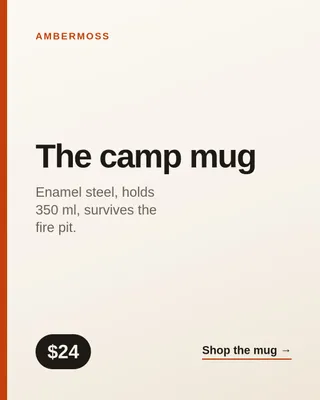
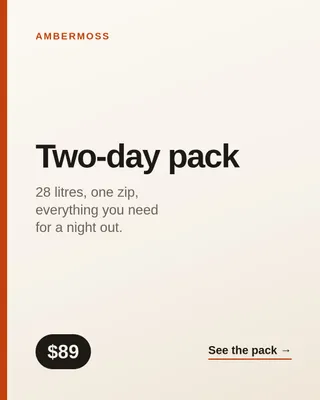
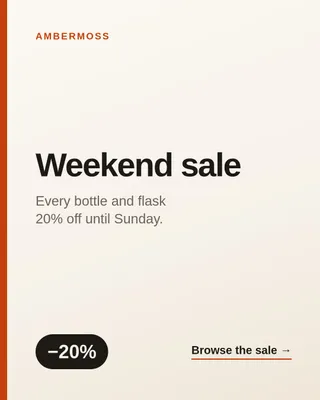
Every row — one POST /api/v1/jobs, over the promo-card template the script saves first
{
  "op": "render_template",
  "templateId": "promo-card@1",
  "items": [
    {
      "brand": "Ambermoss",
      "title": "The camp mug",
      "subtitle": "Enamel steel, holds 350 ml, survives the fire pit.",
      "price": "$24",
      "cta": "Shop the mug →"
    },
    {
      "brand": "Ambermoss",
      "title": "Two-day pack",
      "subtitle": "28 litres, one zip, everything you need for a night out.",
      "price": "$89",
      "cta": "See the pack →"
    }
  ]
}
The PNGs to JPEG — one POST /api/v1/jobs
{
  "op": "convert",
  "assetIds": [
    "ast_…",
    "ast_…"
  ],
  "parameters": {
    "format": "jpeg",
    "quality": 88
  }
}
The whole workflow, as a Node script and an n8n template: recipes/templated-cards. It shows an HTML/CSS template rendered once per row, then converted.
Presets to copy
None of these ships built in: a preset is your macro, versioned under your account, so copy one, change what you need, and keep it. Every one of them is deterministic — no model, no stored layer — so none spends credits, and each also runs synchronously on an image you are holding. Pick one:
| preset | what comes out |
|---|---|
| Instagram square | 1080×1080, cropped to the busiest region, a little more colour, JPEG 90. |
| Instagram story / Reels | 1080×1920 vertical (9:16) for Stories, Reels and TikTok, JPEG 90. |
| YouTube thumbnail | 1280×720, brighter and more saturated, sharpened, and never over YouTube's 2 MB limit. |
| X post | 1600×900 (16:9) for the timeline, JPEG 85. |
| LinkedIn post | 1200×627, JPEG 85. |
| Facebook post | 1200×630 feed image, JPEG 85. |
| Product main image | 2000×2000 on white, the shape Shopify, Amazon and Etsy listings expect. |
| Product thumbnail | 600×600 on white for product grids. |
| Website hero | 1920×1080 banner, WebP 85. |
| Blog featured / Open Graph | 1200×630 for a post header and its social preview, on white where the original was transparent, progressive JPEG. |
| Portfolio web gallery | Upright, sRGB with the profile attached, 1600 px on the long edge, never enlarged, progressive JPEG. |
| Archive, lossless | Lossless WebP with every piece of metadata kept. |
| Print 4×6 in | 1800×1200 at 300 dpi, sharpened for paper, JPEG 100. |
| Dramatic black & white | High-contrast monochrome with crisp detail. |
| Cinematic teal & orange | Warm neutrals and skin, blues pulled towards teal, a little more saturation and contrast — one colour matrix, not split toning. |
| Vintage film | Warm sepia with softened contrast. |
| Auto enhance | Stretch the contrast, sharpen a little. |
| Avatar | 256×256 square PNG for profile pictures. |
Save one, run it
Save the recipe’s JSON as instagram-square.json and post it once:
JavaScript
import { readFile } from "node:fs/promises";

const preset = await client.presets.create(JSON.parse(await readFile("instagram-square.json", "utf8")));
console.log(preset.slug, preset.version); // "instagram-square" 1
Python
import json

preset = client.presets.create(json.load(open("instagram-square.json")))
print(preset["slug"], preset["version"])  # "instagram-square" 1
CLI
imagestep preset create -f instagram-square.json -o jsoncurl
curl -s https://api.imagestep.dev/api/v1/presets -H "Authorization: ApiKey $IMAGESTEP_API_KEY" -H "Content-Type: application/json" -d @instagram-square.jsonThen run it over a batch by slug — or as instagram-square@1, to keep running version 1 after you edit it. A dry run (?dryRun=true) says how many items the batch is and how much of the period’s deterministic-op quota it leaves (processCountLeft).
JavaScript
const job = await client.presets.run("instagram-square", ["ast_1a2b"], { wait: true });
const outputs = await client.jobs.outputs(job);
Python
job = client.presets.run("instagram-square", ["ast_1a2b"], wait=True)
outputs = client.jobs.outputs(job)
CLI
imagestep jobs submit --preset-id instagram-square --asset-ids ast_1a2b --wait -o jsoncurl
# price it first with ?dryRun=true; "wait" holds the response until a one-item job is done (60 s at most)
curl -s https://api.imagestep.dev/api/v1/jobs -H "Authorization: ApiKey $IMAGESTEP_API_KEY" -H "Content-Type: application/json" \
  -d '{"presetId":"instagram-square","assetIds":["ast_1a2b"],"wait":30}'
MCP
# tool call
run_preset  {"preset":"instagram-square","asset_ids":["ast_1a2b"]}
Or run it on one image you are holding — bytes in, bytes out, nothing stored (which presets can):
JavaScript
const bytes = await client.images.transform(null, { file: "./in.jpg", preset: "instagram-square" });Python
data = client.images.transform(None, file="./in.jpg", preset="instagram-square")CLI
imagestep image run --preset instagram-square ./in.jpg --out out.jpgcurl
curl --data-binary @in.jpg -H "Content-Type: image/jpeg" \
  -H "Authorization: ApiKey $IMAGESTEP_API_KEY" \
  "https://api.imagestep.dev/api/v1/images/transform?preset=instagram-square" -o out.jpg
A preset with a model in it — the Marketplace cut-out above starts with remove_bg — cannot take that road: it runs as a chain job (chains).
Reading a recipe
A step is an op from the op catalogue wherever one exists, checked against that op’s parameters when you save the preset. Where no op covers a step — a sharpen, a colour matrix, a progressive JPEG — it is the processing engine’s own operation, one of the keys on preset steps; that is what you write when you author a preset, and an agent running it later only names it. Changing the steps saves a new version, and the old one stays runnable as slug@version. Three things the steps do not say, because the engine does them anyway or not at all:
- Every run is turned upright from the photo’s EXIF orientation before the first step, so no recipe needs an
autoOrient. - A size is what a photo at least that big comes out at. The
resizeop never enlarges unless told to (withoutEnlargement: false): a smaller original comes back smaller, in the same shape. The two e-commerce presets use the engine’sresizeinstead, which does enlarge, so their square is always full size. - The
convertandcompressops put a transparent image on white before writing a JPEG; the engine’sjpegstep does not, and transparency comes out black — which is why the blog preset flattens first.
Anything that is one op needs no preset at all — submit the op itself, such as convert or grayscale. And the utility presets that do ship run by slug with no saving: builtin-util-web-optimize, builtin-util-thumbnail and builtin-util-to-webp (built-ins).
Social
Instagram square
{
  "name": "Instagram square",
  "slug": "instagram-square",
  "description": "1080×1080, cropped to the busiest region, a little more colour, JPEG 90.",
  "steps": [
    {
      "op": "resize",
      "parameters": {
        "width": 1080,
        "height": 1080,
        "fit": "cover",
        "gravity": "attention"
      }
    },
    {
      "op": "adjust",
      "parameters": {
        "saturation": 1.1,
        "brightness": 1.02
      }
    },
    {
      "operation": "sharpen",
      "params": {
        "sigma": 0.5
      }
    },
    {
      "op": "convert",
      "parameters": {
        "format": "jpeg",
        "quality": 90
      }
    }
  ]
}
Instagram story / Reels
{
  "name": "Instagram story / Reels",
  "slug": "instagram-story",
  "description": "1080×1920 vertical (9:16) for Stories, Reels and TikTok, JPEG 90.",
  "steps": [
    {
      "op": "resize",
      "parameters": {
        "width": 1080,
        "height": 1920,
        "fit": "cover",
        "gravity": "attention"
      }
    },
    {
      "op": "adjust",
      "parameters": {
        "saturation": 1.05,
        "brightness": 1.02
      }
    },
    {
      "operation": "sharpen",
      "params": {
        "sigma": 0.5
      }
    },
    {
      "op": "convert",
      "parameters": {
        "format": "jpeg",
        "quality": 90
      }
    }
  ]
}
YouTube thumbnail
{
  "name": "YouTube thumbnail",
  "slug": "youtube-thumbnail",
  "description": "1280×720, brighter and more saturated, sharpened, and never over YouTube's 2 MB limit.",
  "steps": [
    {
      "op": "resize",
      "parameters": {
        "width": 1280,
        "height": 720,
        "fit": "cover",
        "gravity": "attention"
      }
    },
    {
      "op": "adjust",
      "parameters": {
        "saturation": 1.2,
        "brightness": 1.05
      }
    },
    {
      "operation": "sharpen",
      "params": {
        "sigma": 1
      }
    },
    {
      "op": "compress",
      "parameters": {
        "format": "jpeg",
        "quality": 90,
        "maxBytes": 2000000
      }
    }
  ]
}
X post
{
  "name": "X post",
  "slug": "x-post",
  "description": "1600×900 (16:9) for the timeline, JPEG 85.",
  "steps": [
    {
      "op": "resize",
      "parameters": {
        "width": 1600,
        "height": 900,
        "fit": "cover",
        "gravity": "attention"
      }
    },
    {
      "operation": "sharpen",
      "params": {
        "sigma": 0.5
      }
    },
    {
      "op": "convert",
      "parameters": {
        "format": "jpeg",
        "quality": 85
      }
    }
  ]
}
LinkedIn post
{
  "name": "LinkedIn post",
  "slug": "linkedin-post",
  "description": "1200×627, JPEG 85.",
  "steps": [
    {
      "op": "resize",
      "parameters": {
        "width": 1200,
        "height": 627,
        "fit": "cover",
        "gravity": "attention"
      }
    },
    {
      "operation": "sharpen",
      "params": {
        "sigma": 0.5
      }
    },
    {
      "op": "convert",
      "parameters": {
        "format": "jpeg",
        "quality": 85
      }
    }
  ]
}
Facebook post
{
  "name": "Facebook post",
  "slug": "facebook-post",
  "description": "1200×630 feed image, JPEG 85.",
  "steps": [
    {
      "op": "resize",
      "parameters": {
        "width": 1200,
        "height": 630,
        "fit": "cover",
        "gravity": "attention"
      }
    },
    {
      "operation": "sharpen",
      "params": {
        "sigma": 0.5
      }
    },
    {
      "op": "convert",
      "parameters": {
        "format": "jpeg",
        "quality": 85
      }
    }
  ]
}
E-commerce
Product main image
{
  "name": "Product main image",
  "slug": "product-main",
  "description": "2000×2000 on white, the shape Shopify, Amazon and Etsy listings expect.",
  "steps": [
    {
      "op": "flatten",
      "parameters": {
        "background": "#ffffff"
      }
    },
    {
      "operation": "resize",
      "params": {
        "width": 2000,
        "height": 2000,
        "fit": "contain",
        "background": "#ffffff"
      }
    },
    {
      "operation": "sharpen",
      "params": {
        "sigma": 0.5
      }
    },
    {
      "op": "convert",
      "parameters": {
        "format": "jpeg",
        "quality": 90
      }
    }
  ]
}
Product thumbnail
{
  "name": "Product thumbnail",
  "slug": "product-thumbnail",
  "description": "600×600 on white for product grids.",
  "steps": [
    {
      "op": "flatten",
      "parameters": {
        "background": "#ffffff"
      }
    },
    {
      "operation": "resize",
      "params": {
        "width": 600,
        "height": 600,
        "fit": "contain",
        "background": "#ffffff"
      }
    },
    {
      "operation": "sharpen",
      "params": {
        "sigma": 0.5
      }
    },
    {
      "op": "convert",
      "parameters": {
        "format": "jpeg",
        "quality": 80
      }
    }
  ]
}
Web
Website hero
{
  "name": "Website hero",
  "slug": "website-hero",
  "description": "1920×1080 banner, WebP 85.",
  "steps": [
    {
      "op": "resize",
      "parameters": {
        "width": 1920,
        "height": 1080,
        "fit": "cover",
        "gravity": "attention"
      }
    },
    {
      "operation": "sharpen",
      "params": {
        "sigma": 0.5
      }
    },
    {
      "op": "convert",
      "parameters": {
        "format": "webp",
        "quality": 85
      }
    }
  ]
}
Blog featured / Open Graph
{
  "name": "Blog featured / Open Graph",
  "slug": "blog-featured",
  "description": "1200×630 for a post header and its social preview, on white where the original was transparent, progressive JPEG.",
  "steps": [
    {
      "op": "flatten",
      "parameters": {
        "background": "#ffffff"
      }
    },
    {
      "op": "resize",
      "parameters": {
        "width": 1200,
        "height": 630,
        "fit": "cover",
        "gravity": "attention"
      }
    },
    {
      "operation": "sharpen",
      "params": {
        "sigma": 0.5
      }
    },
    {
      "operation": "jpeg",
      "params": {
        "quality": 85,
        "progressive": true
      }
    }
  ]
}
Photography
Portfolio web gallery
{
  "name": "Portfolio web gallery",
  "slug": "web-gallery",
  "description": "Upright, sRGB with the profile attached, 1600 px on the long edge, never enlarged, progressive JPEG.",
  "steps": [
    {
      "op": "resize",
      "parameters": {
        "width": 1600,
        "height": 1600,
        "fit": "inside",
        "withoutEnlargement": true,
        "colorSpace": "srgb"
      }
    },
    {
      "operation": "sharpen",
      "params": {
        "sigma": 0.5
      }
    },
    {
      "operation": "jpeg",
      "params": {
        "quality": 85,
        "progressive": true
      }
    }
  ]
}
Archive, lossless
{
  "name": "Archive, lossless",
  "slug": "archive-lossless",
  "description": "Lossless WebP with every piece of metadata kept.",
  "steps": [
    {
      "operation": "keepMetadata"
    },
    {
      "operation": "webp",
      "params": {
        "lossless": true
      }
    }
  ]
}
Print 4×6 in
{
  "name": "Print 4×6 in",
  "slug": "print-4x6",
  "description": "1800×1200 at 300 dpi, sharpened for paper, JPEG 100.",
  "steps": [
    {
      "op": "resize",
      "parameters": {
        "width": 1800,
        "height": 1200,
        "fit": "cover",
        "gravity": "attention"
      }
    },
    {
      "operation": "sharpen",
      "params": {
        "sigma": 1.5,
        "m1": 1.5,
        "m2": 0.7
      }
    },
    {
      "operation": "withMetadata",
      "params": {
        "density": 300
      }
    },
    {
      "op": "convert",
      "parameters": {
        "format": "jpeg",
        "quality": 100
      }
    }
  ]
}
Looks
Dramatic black & white
{
  "name": "Dramatic black & white",
  "slug": "dramatic-bw",
  "description": "High-contrast monochrome with crisp detail.",
  "steps": [
    {
      "op": "grayscale"
    },
    {
      "operation": "normalize"
    },
    {
      "operation": "linear",
      "params": {
        "a": 1.3,
        "b": -20
      }
    },
    {
      "operation": "sharpen",
      "params": {
        "sigma": 1.5
      }
    }
  ]
}
Cinematic teal & orange
{
  "name": "Cinematic teal & orange",
  "slug": "cinematic",
  "description": "Warm neutrals and skin, blues pulled towards teal, a little more saturation and contrast — one colour matrix, not split toning.",
  "steps": [
    {
      "op": "adjust",
      "parameters": {
        "saturation": 1.1
      }
    },
    {
      "operation": "recomb",
      "params": [
        [
          1.1,
          0,
          0.05
        ],
        [
          0,
          1,
          0.1
        ],
        [
          0.1,
          0.1,
          0.9
        ]
      ]
    },
    {
      "operation": "linear",
      "params": {
        "a": 1.1,
        "b": -5
      }
    }
  ]
}
Vintage film
{
  "name": "Vintage film",
  "slug": "vintage-film",
  "description": "Warm sepia with softened contrast.",
  "steps": [
    {
      "operation": "recomb",
      "params": [
        [
          0.393,
          0.769,
          0.189
        ],
        [
          0.349,
          0.686,
          0.168
        ],
        [
          0.272,
          0.534,
          0.131
        ]
      ]
    },
    {
      "operation": "linear",
      "params": {
        "a": 0.9,
        "b": 15
      }
    },
    {
      "op": "adjust",
      "parameters": {
        "saturation": 0.8
      }
    }
  ]
}
Auto enhance
{
  "name": "Auto enhance",
  "slug": "auto-enhance",
  "description": "Stretch the contrast, sharpen a little.",
  "steps": [
    {
      "operation": "normalize"
    },
    {
      "operation": "sharpen",
      "params": {
        "sigma": 0.5
      }
    }
  ]
}
Utility
Avatar
{
  "name": "Avatar",
  "slug": "avatar",
  "description": "256×256 square PNG for profile pictures.",
  "steps": [
    {
      "op": "resize",
      "parameters": {
        "width": 256,
        "height": 256,
        "fit": "cover",
        "gravity": "attention"
      }
    },
    {
      "operation": "sharpen",
      "params": {
        "sigma": 0.5
      }
    },
    {
      "operation": "png",
      "params": {
        "compressionLevel": 6
      }
    }
  ]
}